Aspire is Local Development Security G.L.U.E.
Local development is the least governed environment in most organisations. .NET Aspire closes that gap by being Governed, Local, Upstream and Everywhere: one AppHost, real containers, emulated cloud services, and the same graph from laptop to test suite and pipeline.
Most security reviews stop at the edge of the pipeline. Nobody threat-models the developer's laptop, yet that's where secrets get pasted into .env files, where dependencies get faked with in-memory stand-ins that behave nothing like production, and where "works on my machine" quietly becomes the biggest source of surprises after deployment. Local development is the least governed environment in most organisations, and it's the one every single change passes through first.
The Problem With "Local"
Ask five developers on the same team how they run the system locally and you'll often get five different answers: a README with eleven steps, a Docker Compose file nobody has updated in months, a set of Postman collections against a shared dev environment because local setup was never worth the pain. Every gap in that story gets filled with a workaround, and workarounds are where insecure defaults live. Shared credentials in a team wiki, long-lived cloud access keys issued "just for testing", dependencies mocked so thoroughly that the real integration is never actually exercised until it hits staging.
.NET Aspire doesn't set out to solve any of this. It fixes a great deal of it anyway, as a side effect of being a genuinely good orchestration model. We think of it as G.L.U.E. for Governed, Local, Upstream, Everywhere. Four properties that, together, close a surprising number of the gaps that turn "local dev" into a security blind spot.
Aspire's AppHost model, a single C# project that declaratively describes every resource in your system and how they connect, removes most of the reasons those workarounds exist in the first place.
G - Governed: One AppHost, Zero Configuration Drift
The AppHost is the whole system, in code, in source control. There's no separate config step between "clone the repo" and "the system is running with every service correctly wired to every other service". Connection strings, service discovery, and environment variables are generated and injected automatically based on the dependency graph you've declared, not copied by hand between .env files that inevitably drift out of sync.
- No tribal knowledge required. A new starter, a contractor, or a non-technical stakeholder who needs to see the real product running doesn't need a README interpreted correctly on the first try, they need .NET, Docker, and one command.
- Nothing to reverse-engineer. The AppHost project is the documentation. There's no separate diagram that goes stale the week after someone draws it.
- Consistent by construction. Because every developer runs the same graph, "it works locally" starts meaning something again, instead of being a running joke.
A README tells someone what to do. An AppHost does it. The difference matters for security because every manual step is a place where someone can, reasonably and understandably, take a shortcut that a script never would.
L - Local: Real Containers, Every Stack, One Command
Aspire doesn't care what language a resource is written in. A .NET API, a Python worker, a Node front end, and a Go service can all sit in the same AppHost, each started the way it actually runs in production. You have a choice: run the applications in-process if your local environment supports it, or containerise and run them isolated, as they would in production. All wired together with one dotnet run (or aspire run).
var builder = DistributedApplication.CreateBuilder(args);

var storage = builder.AddAzureStorage("storage")
                     .RunAsEmulator();

var cache = builder.AddRedis("cache");
var messaging = builder.AddKafka("messaging");

var api = builder.AddProject<Projects.Api>("api")
                 .WithReference(storage)
                 .WithReference(cache)
                 .WithReference(messaging);

// python worker app
var worker = builder.AddDockerfile("worker", "../worker")
                    .WithReference(messaging);

// react based front end app
var frontend = builder.AddDockerfile("frontend", "../frontend")
                      .WithHttpEndpoint(port: 3000, targetPort: 3000)
                      .WithReference(api);

builder.Build().Run();
That single file replaces a stack of README steps, a Docker Compose file, and a handful of "just start it manually in this order" instructions. Because the dependencies can run in real containers rather than lightweight fakes, the behaviour a developer sees locally (startup order, connection handling, retries) is far closer to what the same components do under a container orchestrator in production.
A developer gets Azurite standing in for Azure Storage, Kafka running as a real broker in a container, Redis, RabbitMQ, or the Service Bus emulator, all wired up automatically, all torn down when they stop the AppHost. Nothing is left running against a shared cloud subscription because nobody wanted to, or didn't know how to, configure it properly.
U - Upstream: Emulate the Cloud, Don't Mock It
This is where Aspire earns its place in a security conversation rather than just a developer experience one. Cloud storage, service buses, and message queues are exactly the kind of dependency teams historically mock away, because standing up a real Azure Storage account or a Kafka cluster for every developer is expensive and slow. Mocking hides real behaviour: permission errors, serialisation quirks, throttling, retry semantics. All of it goes untested until it surfaces against the genuine article, often for the first time in a shared environment, sometimes for the first time in production.
Aspire's emulator resources close that gap without the cost.
Azurite doesn't implement every corner of the Azure Storage API, and no local Kafka broker perfectly replicates a managed cluster's failure modes. Perfection is the enemy of progress, get closer to your target environment. Treat emulated parity as a very good approximation that dramatically reduces surprises, not a reason to skip validating against the real upstream service in a proper pre-production environment before go-live.
E - Everywhere: The Same Graph, From Laptop to Test to Pipeline
The same AppHost that runs your system on a laptop can boot that exact graph inside an automated test, using Aspire.Hosting.Testing:
[Fact]
public async Task Api_returns_healthy_when_dependencies_are_up()
{
    var appHost = await DistributedApplicationTestingBuilder
        .CreateAsync<Projects.AppHost>();

    await using var app = await appHost.BuildAsync();
    await app.StartAsync();

    var client = app.CreateHttpClient("api");
    var response = await client.GetAsync("/health");

    Assert.Equal(HttpStatusCode.OK, response.StatusCode);
}
Teams already using Testcontainers to spin up real dependencies for integration tests will recognise exactly what problem this solves. However, instead of hand-rolling container lifecycle code per test project, you get the same dependency graph, the same wiring, and the same emulated upstream services you already defined once for local development. The environment your tests run against, the environment a developer debugs against, and the environment your pipeline validates against are, structurally, the same environment.
This has the downside of taking longer for tests to run initially. The benefits of more accurate integration tests, though, more than make up for it.
One dashboard, the whole graph
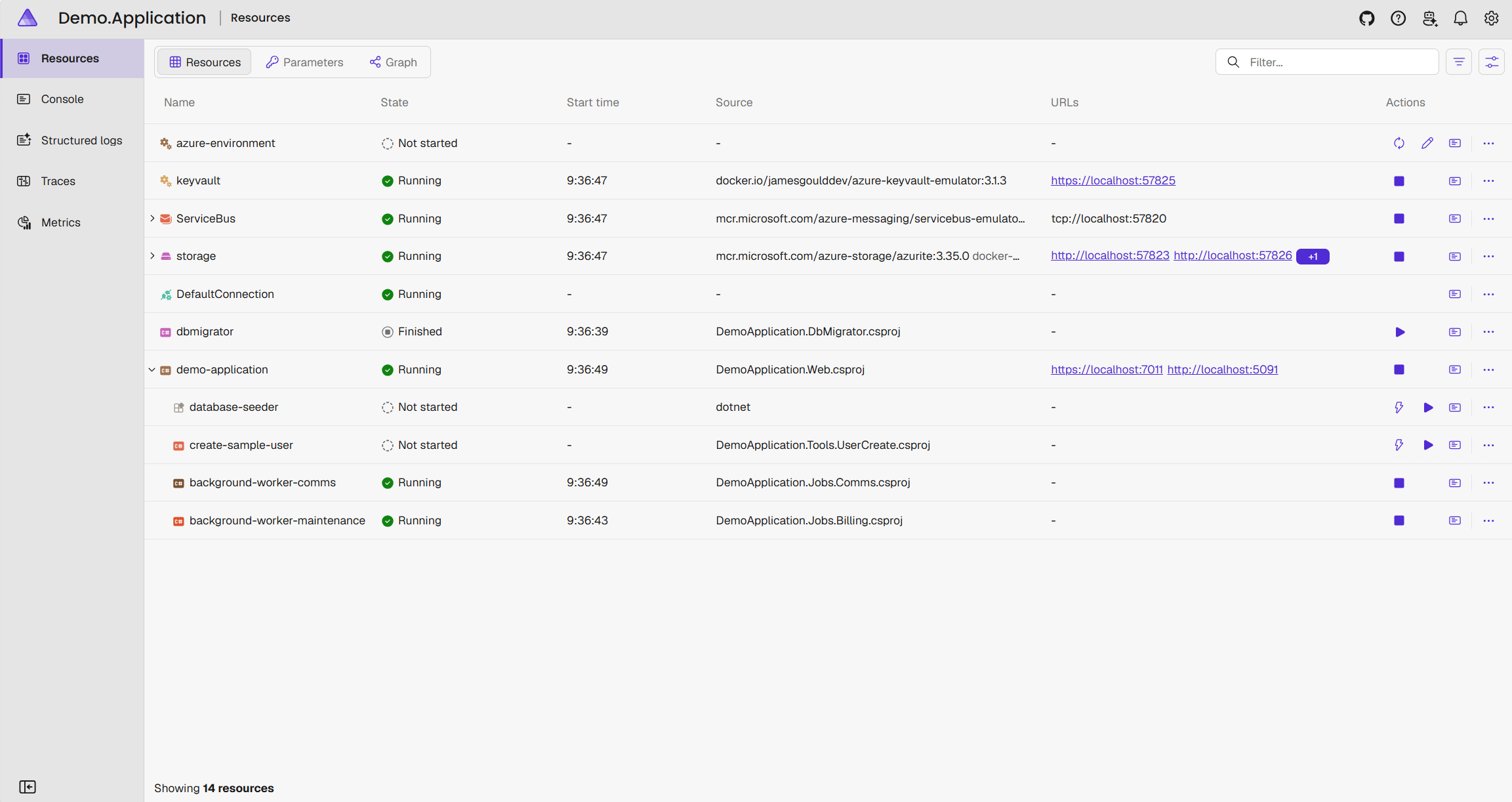
Running everything with one command would matter a lot less if nobody could see what "everything" actually was. Every AppHost launches with a dashboard that renders the dependency graph you declared as an actual, live picture: every resource, every reference between them, and the current state of each one, starting, running, unhealthy, stopped.
From there it's the same view whether the resource is your own API, a Kafka container or a SQL database: structured logs, console output, distributed traces, and metrics, per resource, with no separate log aggregation stack to set up just to develop locally.
If your API is quietly making a call to something it shouldn't (an unexpected outbound request, a dependency nobody remembered wiring in), it shows up in the trace view, on a laptop, before it ever reaches a shared environment where that kind of thing is harder to spot and more expensive to explain.
It's also the fastest way to show someone non-technical what the system actually is. Developer experience doesn't have to be just for developers.
One-off tools, without a terminal
Every codebase collects a handful of scripts only their author feels entirely confident running: a database reseed, a script that mints a test user with the right roles, a cache flush before a demo. They live in a scripts/ folder, get run maybe once a fortnight, and depend on someone remembering the right flags, or, just as often, on asking the one engineer who wrote it to do it for them.
Aspire resource commands turn those scripts into buttons in the dashboard, with an optional dialog for any input they need. Nobody opens a terminal, and nobody needs to remember an argument list.
var db = builder.AddPostgres("postgres").AddDatabase("appdb");

var api = builder.AddProject<Projects.Api>("api")
                 .WithReference(db);

// A one-off task, exposed as a single confirm-and-run button
api.WithCommand(
    name: "seed-data",
    displayName: "Seed test data",
    executeCommand: async context =>
    {
        await DataSeeder.RunAsync(context.CancellationToken);
        return CommandResults.Success();
    },
    commandOptions: new CommandOptions
    {
        IconName = "DatabaseLightning",
        ConfirmationMessage = "This resets and reseeds the local database. Continue?"
    });

// A sporadic task that needs input, collected through a dashboard dialog
api.WithCommand(
    name: "create-test-user",
    displayName: "Create test user",
    executeCommand: async context =>
    {
        var interaction = context.ServiceProvider.GetRequiredService<IInteractionService>();

        var emailInput = new InteractionInput { Label = "Email", InputType = InputType.Text };
        var roleInput = new InteractionInput {
            Label = "Role",
            InputType = InputType.Choice,
            Options = ["Admin", "Standard", "ReadOnly"]
        };

        var result = await interaction.PromptInputsAsync(
            title: "Create a test user",
            message: "Enter details for the new local account",
            inputs: [ emailInput, roleInput ]);

        if (result.Canceled)
        {
            return CommandResults.Success();
        }

        if (string.IsNullOrWhiteSpace(emailInput.Value) || string.IsNullOrWhiteSpace(roleInput.Value))
            return CommandResults.Failure("Email and role are required.");

        await TestUserFactory.CreateAsync(emailInput.Value, roleInput.Value);
        return CommandResults.Success();
    },
    commandOptions: new CommandOptions { IconName = "PersonAdd" });
A support engineer investigating a bug, or a QA tester who's never opened a terminal, can now create a properly permissioned test account or reset seed data themselves, accurately, every time, instead of pinging an engineer or, worse, being handed a shared "test123" login that everyone reuses forever.
Why This Is a Security Story, Not Just Developer Experience
Every one of these properties removes a reason for someone to reach for an insecure shortcut:
- Fewer secrets scattered around. No per-developer
.envfiles means fewer places a credential can be committed by accident. - Fewer shadow cloud resources. Emulated storage and messaging mean developers aren't quietly provisioning their own "just for testing" cloud resources that never get decommissioned.
- Fewer ad hoc scripts of unknown vintage. A
scripts/reset-db.shlast touched two years ago becomes a versioned, reviewed command sitting in the same file as the rest of the system, not a trust exercise every time someone runs it. - No hidden topology. The dashboard shows every resource and every connection between them as it actually is, not as someone remembers it from a diagram, which makes an unexpected dependency or an unexpected outbound call hard to miss.
- Wider review coverage. When a QA lead, a support engineer, or a security reviewer can run the actual system with one command and see its shape on a dashboard, more people can meaningfully look at it, not just the engineers who already know the tribal setup.
- Fewer late surprises. Integration issues surface on a laptop, in a PR, or in a test run, rather than in a shared environment, which is the first genuinely dangerous place for them to appear.
Getting Started Without Boiling the Ocean
You don't need to migrate an entire estate to Aspire in one go to get value from this:
- Start with one service and its nearest dependency. Wrap an existing API and its cache or queue in an AppHost before you touch anything else.
- Move mocked dependencies to emulated ones first. This is where the biggest hidden bugs tend to surface.
- Turn existing one-off scripts into commands. If it already exists as a script nobody quite trusts, wrapping it as a dashboard command is a smaller change than it looks, and it's an easy way to show a non-technical stakeholder what's changed.
- Add the test host once local orchestration is solid. Reusing the AppHost in tests is close to free once it already exists.
- Let adoption spread by usefulness, not mandate. Teams tend to copy a working AppHost faster than they follow a policy document.
- Lean on an AI friendly setup. With the right local harness and LLM, standing up an AppHost to get you started is just a few prompts away.
The Caveat
Of course there are some drawbacks. Aspire is a great tool used right, but there is always equivalent exchange. Chances are your developers already have machines with enough processing and memory bandwidth to support running locally. Can they run the whole stack locally though? Database servers, message queues, and multiple containers all running in addition to the IDE and other local requirements. It all adds up.
How We Can Help
We work with engineering teams to close exactly this kind of gap between how software is built and how it's actually going to run:
- Local-to-cloud parity reviews, identifying where mocked or manual setup is hiding real risk
- Aspire adoption support, from a first AppHost to full team rollout
- Golden path design for onboarding, so new joiners, technical or not, are productive on day one
- CI/CD alignment, so the environment your pipeline tests against matches the one your developers actually use
Get in touch to talk through where your local development setup might be quietly working against you.
Final Takeaway
Local development doesn't have to be the least governed part of your delivery pipeline. Aspire gives you a single, governed definition of your system, including the one-off tools around it, real local containers across every stack and every OS you run, visible end to end on one dashboard, upstream services emulated instead of mocked away, and one environment definition that carries from a laptop through to your test suite and beyond if you want it to. Individually, each of those is a developer experience win. Together, they're G.L.U.E., and they quietly close some of the easiest security gaps to miss and the hardest ones to notice you have.
Want more insights?
Join our mailing list for future blog posts and practical Azure security guidance.